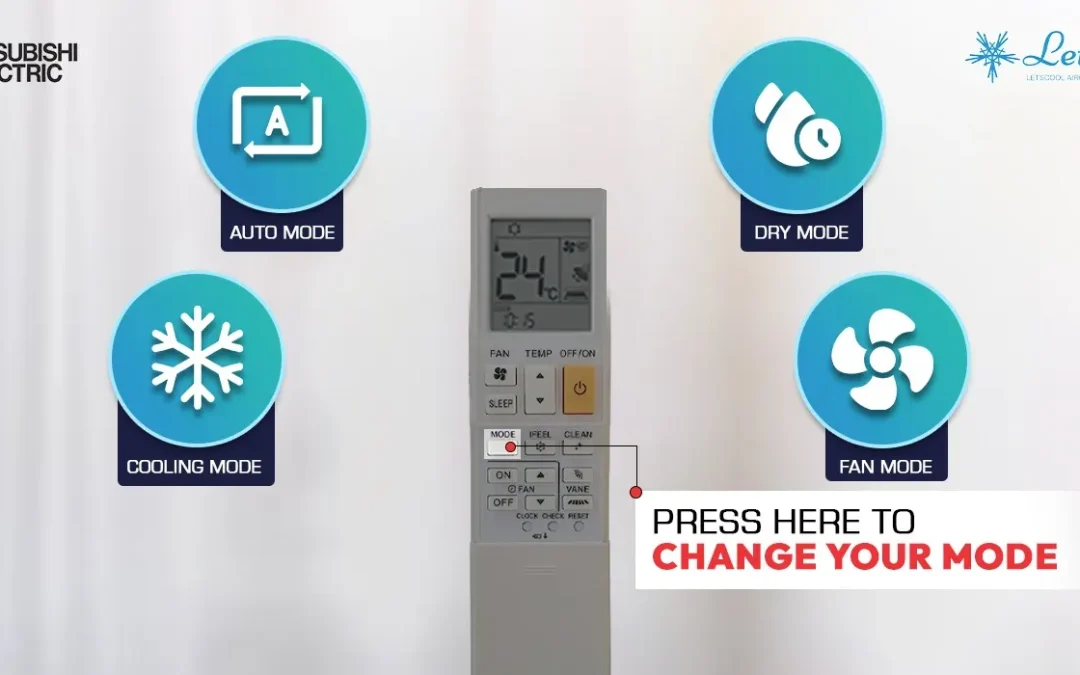
If you are using a Mitsubishi Electric air conditioner, the remote control is the main way to manage your comfort at home. But for many users, the remote can feel confusing at first. There are different buttons, symbols, and operating modes, and not everyone knows what each setting does.
This guide explains how to use a Mitsubishi Electric aircon remote control in a simple and practical way. Whether you stay in an HDB flat, condo, landed property, or office in Singapore, this article will help you understand the common buttons, choose the right settings, and avoid common mistakes.
At Letscool Aircon, we often meet customers who think their aircon has a fault, when in fact the issue is only the remote setting. A wrong mode, very low temperature, or incorrect fan speed can affect cooling performance and comfort.
Why it is important to understand your Mitsubishi Electric remote
Many people only use the power button and temperature buttons. However, a Mitsubishi Electric remote control does much more than that. It helps you control cooling mode, fan speed, airflow direction, and timer settings.
When used correctly, the remote helps you:
- cool your room more effectively
- avoid overcooling
- improve night-time comfort
- reduce unnecessary electricity usage
- avoid confusion about normal aircon operation
For Singapore homes, where aircon is used often because of the hot and humid weather, learning the correct settings can make a noticeable difference.
Who is this guide for?
This guide is written for:
- Singapore homeowners
- HDB and condo residents
- tenants using Mitsubishi Electric systems
- users of standard Mitsubishi Electric remote controls without Wi-Fi
- people who want simple explanations of buttons, symbols, and settings
This article does not focus on app-based or Wi-Fi control. It is meant for users operating Mitsubishi Electric aircon units with a normal handheld remote control.
Mitsubishi Electric remote buttons explained
Different Mitsubishi Electric remote models may look slightly different, but most standard non-Wi-Fi remote controls include similar basic functions.
1. Power button
This is the ON/OFF button used to start or stop the aircon. When you switch it on, the unit will run according to the last setting used or the current selected setting.
2. Mode button
The mode button allows you to choose how the aircon operates. Common modes include:
- Cool mode
- Dry mode
- Fan mode
- Auto mode
- Heat mode on selected models only
For most homes in Singapore, Cool mode and Dry mode are the most commonly used.
3. Temperature up and down buttons
These buttons adjust the set temperature. If the room feels too cold, you may need to increase the setting slightly. If the room is still warm, reduce the temperature step by step.
For most Singapore homes, a comfortable range is usually:
- 24°C to 25°C for living rooms
- 25°C to 26°C for bedrooms
- 23°C to 24°C during hotter afternoons
4. Fan speed button
This button controls how strongly the indoor unit blows air. Typical options may include:
- Auto
- Low
- Medium
- High
Higher fan speed helps cool the room faster. Lower speed is quieter and more suitable for night use.
5. Swing or vane button
This controls the airflow direction. You can use it to point the cool air upward, downward, or across the room. Some remotes also allow a swinging airflow function for more even cooling.
6. Timer button
The timer function lets you set the aircon to turn on or off automatically. This is helpful for sleeping hours or when you do not want the unit running for too long.
7. Sleep or comfort settings
Some Mitsubishi Electric remotes may include a sleep-related setting depending on model. This can help reduce discomfort from overcooling during the night.
Explain Aircon Modes of Mitsubishi Electric
One of the most common user questions is: which mode should I use?
Cool mode
Cool mode is the standard setting for everyday use in Singapore. It is the best mode when you want proper air conditioning and direct cooling.
Use Cool mode when:
- the weather is hot
- the room needs fast cooling
- you want full cooling performance
Dry mode
Dry mode helps remove humidity from the room. This is useful when the weather feels damp, sticky, or rainy.
Use Dry mode when:
- the room feels humid
- the weather is rainy
- you want lighter cooling
Fan mode
Fan mode only circulates air. It does not cool like normal aircon operation.
Use Fan mode when:
- the room is already cool
- you only want air movement
- you do not need full cooling
Auto mode
Auto mode allows the system to decide how to operate based on room conditions. Some users prefer it for convenience, while others prefer Cool mode for direct control.
Heat mode
Some Mitsubishi Electric models may include Heat mode, but this is not commonly used in Singapore residential aircon systems. For most local users, this function is usually not relevant.
Recommended Aircon Temperature settings – Singapore
Because Singapore weather is warm and humid throughout the year, the best settings are usually simple and practical.
Recommended daytime setting
Cool mode
- 24°C to 25°C
- Auto or medium fan speed
- swing on if needed
Recommended bedroom night setting
Cool mode
- 25°C to 26°C
- low or auto fan speed
- timer on if preferred
- airflow directed away from the bed
Recommended rainy day setting
Dry mode
- doors and windows closed
- moderate airflow
How to set airflow direction and swing function
The airflow direction can affect comfort more than many users realise.
If the cool air blows directly onto your body all night, you may feel too cold or uncomfortable. Instead, direct the air slightly upward or across the room.
Swing mode is useful for:
- larger rooms
- rooms with uneven cooling
- living rooms with multiple seating areas
- reducing direct cold air on one person
Benefits of using the timer function
The timer function is very useful for everyday home use.
- Set the time for automatic Turn off the aircon after you fall asleep
- reduce unnecessary electricity use.
- control cooling hours more efficiently.
- avoid running the unit all night if not needed.
For example, if your room cools quickly, you can set the timer to switch off after 2 to 4 hours.
What to do if the Mitsubishi Electric remote is not working
If your remote is not responding properly, check these points first.
-
Replace the batteries: Weak batteries are one of the most common reasons a remote stops working properly.
-
Check the display screen : If the screen is blank or fading, the batteries may be weak or inserted incorrectly.
-
Point the remote directly at the indoor unit : The signal must reach the receiver on the indoor unit clearly.
How to Restart the Aircon Using Remote Control in Mitsubishi Electric
Sometimes, your Mitsubishi Electric aircon may not respond properly, may not cool as expected, or may seem to stop working normally. In some cases, a simple restart using the remote control can help reset the operation.
For standard Mitsubishi Electric models without Wi-Fi, restarting the aircon with the remote is usually very simple.
Step 1: Turn off the aircon
Press the ON/OFF button on the remote control to switch off the indoor unit. Make sure the aircon fully stops running before moving to the next step.
Step 2: Wait for a few minutes
After turning it off, wait for around 3 to 5 minutes. This short waiting time allows the system to pause properly before restarting. Do not keep pressing multiple buttons during this time.
Step 3: Turn the aircon on again
Press the ON/OFF button again to switch the unit back on. The aircon should restart based on the last selected settings, such as Cool mode, fan speed, and temperature.
Step 4: Check the settings
After restarting, check that the remote is set correctly:
- Mode: Cool mode
- Temperature: around 24°C to 26°C
- Fan speed: Auto, Medium, or High depending on room condition
- Swing: adjust if needed
Note : Sometimes the issue is not the system itself, but simply the wrong mode or temperature setting.
Frequenty Asked Questions
How do I use a Mitsubishi aircon remote control?
To use a Mitsubishi aircon remote control, press the power button to turn on the air conditioner. Then select the mode you want, such as Cool, Dry, or Fan. After that, adjust the temperature, fan speed, and swing setting based on your comfort. Understanding these basic functions makes it easier to use your Mitsubishi aircon every day.
What do the buttons on a Mitsubishi Electric aircon remote mean?
A Mitsubishi Electric aircon remote usually includes buttons for Power, Mode, Temperature, Fan Speed, Swing, Timer On, and Timer Off. Some models may also have extra options like Sleep mode or Powerful mode. Each button helps you control the cooling performance and airflow more easily.
Which mode should I choose on my Mitsubishi aircon remote?
The best mode depends on what you need. Cool mode is commonly used for normal cooling. Dry mode helps reduce humidity in the room. Fan mode circulates air without giving strong cooling. Choosing the correct mode on your Mitsubishi aircon remote control can improve comfort and save energy.
What is the best temperature setting for a Mitsubishi aircon?
For daily comfort, many users set their Mitsubishi aircon between 24°C and 25°C. This temperature range is usually comfortable while also helping reduce electricity usage. Setting the temperature too low may increase power consumption.
How do I change the fan speed on a Mitsubishi aircon remote?
To change the fan speed, press the Fan button on the remote. The system will cycle through options such as Auto, Low, Medium, and High, depending on the model. Adjusting the fan speed helps you control how strong or gentle the airflow feels.
How do I use the swing function on a Mitsubishi aircon remote control?
Press the Swing or Vane button to control the direction of the airflow. Some Mitsubishi models allow fixed airflow direction, while others let the air move automatically. This feature helps spread cool air more evenly around the room.
How do I set the timer on a Mitsubishi aircon remote?
To set the timer, press the Timer On or Timer Off button and choose the time you want the aircon to start or stop. This feature is useful if you want the room to be cool before you arrive or want the unit to turn off automatically at night.
Why is my Mitsubishi aircon remote not working?
If your Mitsubishi aircon remote is not working, first check the batteries and make sure they are placed correctly. Also make sure there is no blockage between the remote and the indoor unit. If the problem continues, try resetting the remote or checking whether the aircon unit is receiving power.
How do I reset a Mitsubishi aircon remote control?
To reset the remote, remove the batteries and wait for a short time before inserting them again. Some models may also have a small reset button inside the battery area. Resetting the remote can help fix minor response issues.
How do I restart the aircon using a Mitsubishi Electric remote?
To restart the aircon, turn the unit off using the remote, wait a few seconds, and then press the power button again to switch it back on. If the aircon does not respond, check the batteries and confirm that the indoor unit has power.
How can I use my Mitsubishi aircon remote more efficiently?
For better efficiency, use Cool mode at a moderate temperature, choose Auto fan speed when suitable, and make use of the timer function. Regular aircon servicing also helps the unit respond better to the settings on the remote. Good usage habits can improve cooling performance and help save electricity.